We are trying to implement the Twitter Conversion API for a client. We used Stape sGTM hosting, and are using the Stape Twitter Conversion API template tag in the GTM server container.
Despite adding all of the correct values in the correct fields, we’re receiving feedback from Tiwtter/X’s technical team that:
" the tokens are on the request body and not the header"
So that seems like the structure of the tag template is not correct.
Has anyone else tried implementing the Twitter Conversion API with Stape’s sGTM template tag, and gotten it to work?
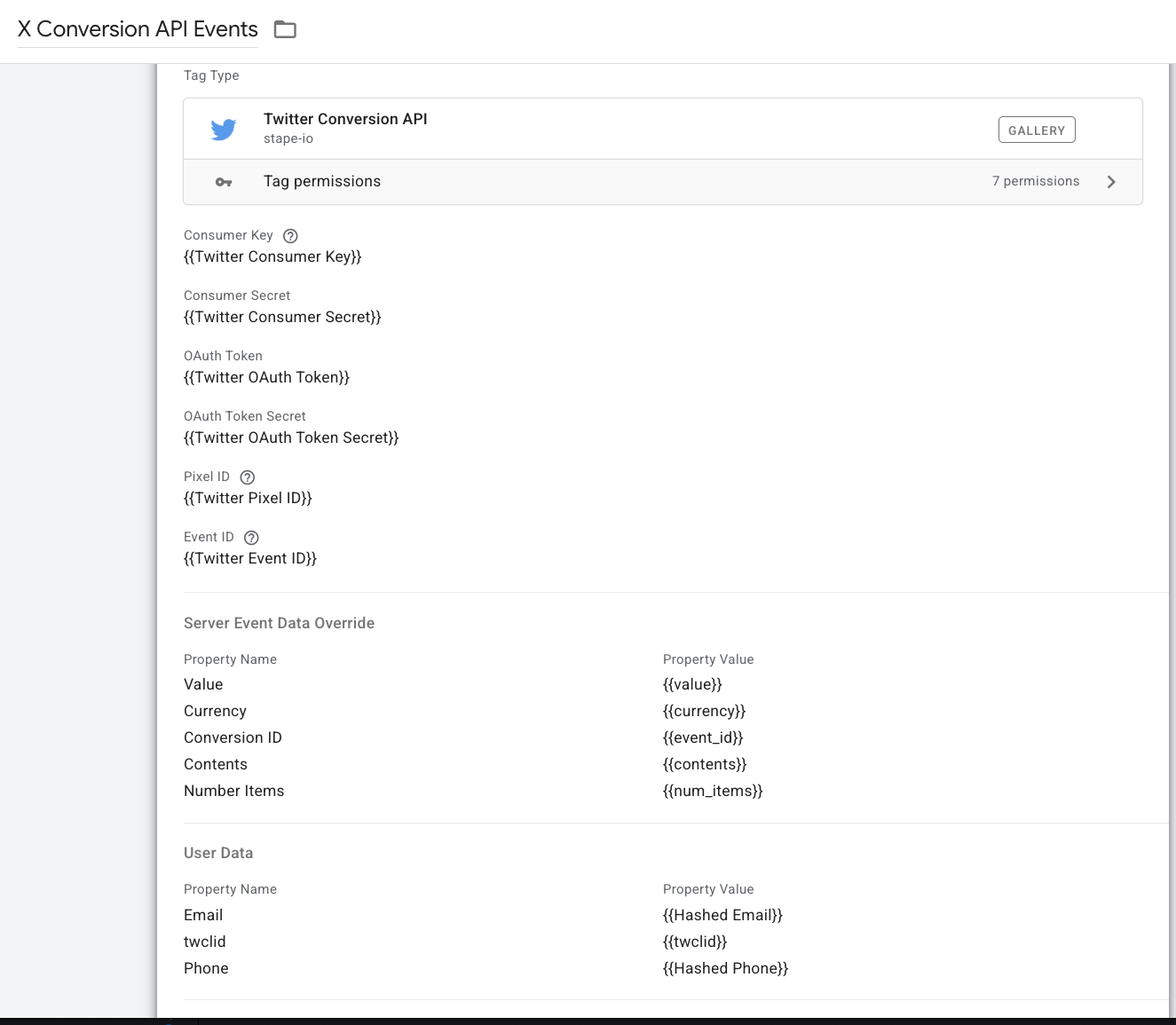
Attached is the tag setup - which has been confirmed by Stape support as correct. The one thing was they said the “twclid” value needed to just be the twclid URL param, not the _twclid cookie value, so that has been updated.
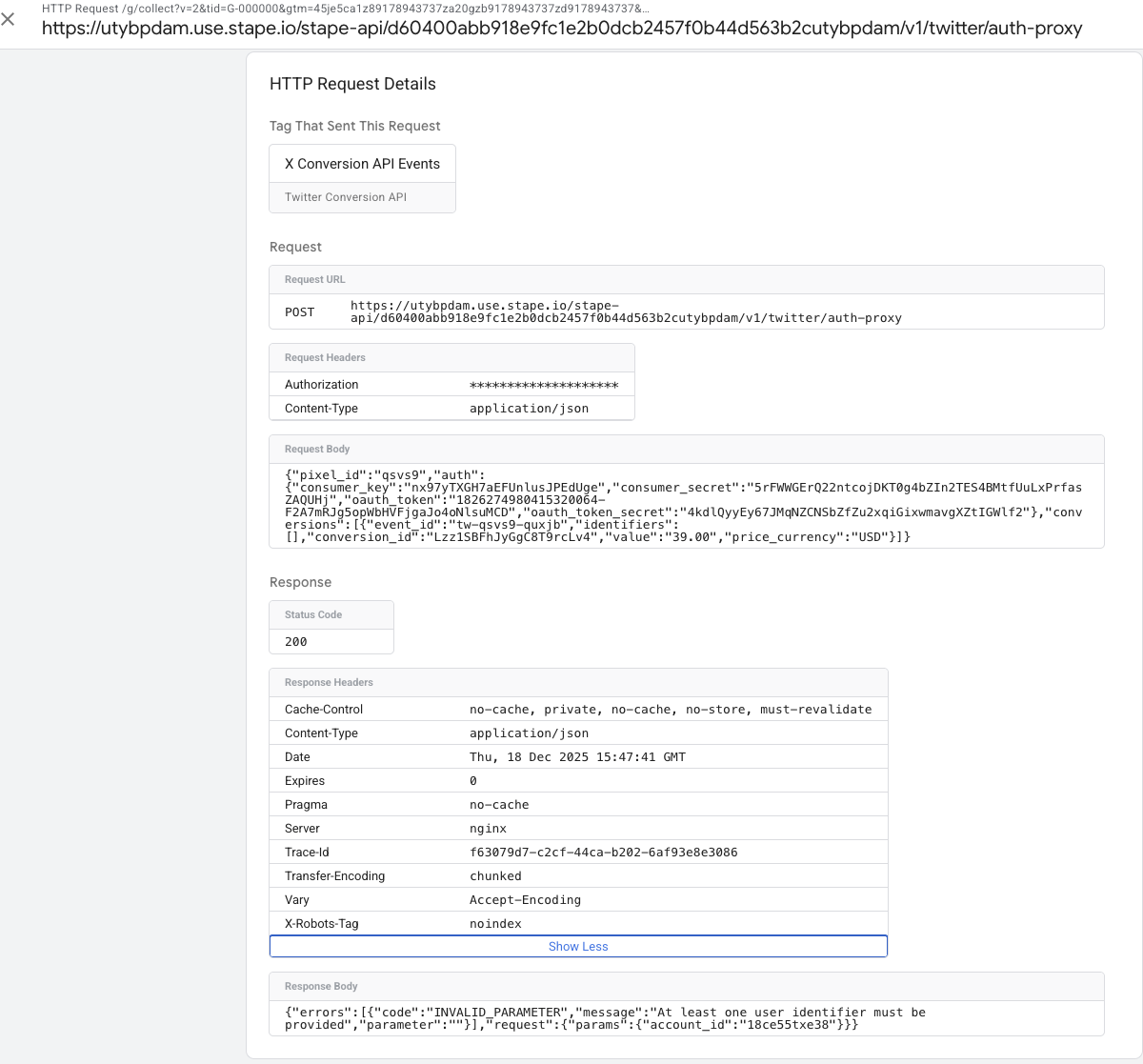
On the request details - I can see there are authentication items in the request body - which is the feedback we received from the X technical team is incorrect and causing 400 status code errors on their end.
the concern I have is there isn’t another way to configure the tag. And the authentication items are on the body - which directly from the X technical team - throws errors on their end. So that would mean the tag template design is incorrect and needs to be restructured.
you are sending anonymous events, so w/o PII or a click-id cookie. Twitter CAPI needs except one parameter to digest requests. Please test with an email - it will work tyhen.
You may have noticed the tag is sending requests to Stape API, not directly to twitter, so you can not see the final outgoing request that we’re sending where all of the auth get appended and I can assure you the template is correctly built.
thanks for your response Dan. A couple of clarification questions:
1). This request was for a “view_item” event on a PDP. At that stage, we wouldn’t have email or phone PII, and would only have the twclid if the user/session came from an ad. So just to confirm - Twitter CAPI events won’t send unless they have a user match parameter - so they’ll only fire on events with sessions that originated from ads (with twclid), OR on a Purchase event where we have the email/phone, correct?
2). Stape support instructed us not to send the “_twclid” cookie value for the match, but the original “twclid” URL query parameter value. Is that correct? We have both available, so just want to confirm.
3). The direct feedback from the X Technical Team was that authentication was being sent in the Request Body. So they’re seeing events received, but with errors on them. Which can be seen here - with the authentication keys in the Body data. This match key/PII feedback item doesn’t seem to address that. We’ll make sure to address that, but I want to follow-up on the aspect of the authentication in the Request Body.
According to our tests and previous configurations for clients, I have such answers:
Yes. You need to send data via CAPI only in case you have an email, phone, or twclid.
You need to send the original twclid parameter.
We send AUTH data in headers and in the body. There were no issues with this. We will configure your container send data only in headers and will write here when this is ready (ETA 1 day).
In case you have other information from the Twitter team, please write it here.
I think we’ll just let the events without those identifiers process/send, and then if they’re rejected or error out, it’s ok.
Got it - we adjusted our config to store just the twclid on the landing page (not the full _twclid cookie value with timestamp, etc.)
Sounds good - thank you. I’m also checking with the client to see if we can loop in a contact from the X technical team to get all feedback. I’m sure the X team, and you all at Stape, want this template and setup to work per their needs, especially if there has been a change with the authentication included in the Request body.
This is all the feedback we have from them currently:
*“We are seeing errors on our end which seems to be related to how the event was constructed. We’ve identified that the API tokens are being sent as part of the request body but they should only be on the header.”
“We’re still getting the 400 status codes because the tokens are on the request body and not the header. Can you please change that and let us know.”
Hi Dan - I believe that the updates made did the trick - as we haven’t received any additional feedback on the setup (we only hear when it’s not working, haha).
So thank you all so much for the quick responses and work on it!