Because the consent states in the sandbox are not automatically updated with the consent-choice from the website.
I am using DataLayer Checker Plus extension for Chrome and I clearly see that the status of ad_storage and analytics_storage are always “denied”.
So basically the tracking stops working when a user triggers the begin_checkout. I can also see this in GA4 realtime tracking because there is not a single begin_checkout, add_payment_info, add_shipping_info or purchase event.
Is there any solution for that (that is in accordance with GDPR as well)? Because I did try some things using the help of AI but none really worked.
Regarding Stape: latest app version, setup in webGTM and sGTM via Setup Assistant. So basically everything done by the book.
To resolve this issue, I would advise you to initialise the CookieBot via native tag in GTM rather than via theme.liquid, as suggested in the article you’ve linked to.
If you are using our app, which loads GTM script in the sandbox(checkout), the consent status will be available at checkout.
So no cookie-consent.liquid and no cookiebot script in theme.liquid (basically ignoring their whole description), but instead using the Cookiebot CMP tag template in GTM.
I guess we’ll have to live with the disadvantages (die consent bannner loads much later than when it’s directly implemented via theme.liquid) then.
The reason checkout shows denied usually isn’t just where the Cookiebot script loads. It’s about whether your CMP consent is being synced into Shopify’s Customer Privacy API.
Here’s the pattern I’ve seen: the CMP sets consent state on the storefront, but the checkout sandbox doesn’t automatically read your CMP cookie or GTM dataLayer state. Shopify-managed checkout/pixels rely on Shopify’s own customer privacy state. So if nothing bridges your CMP decision into Shopify’s Customer Privacy API, checkout can still behave as if analytics/marketing consent is denied, even after the user clicked Accept.
The Cookiebot Shopify app should handle this sync. A manual theme.liquid install from the generic Cookiebot docs may not. That’s probably where the setup breaks.
Loading Cookiebot via GTM, as Dmytro suggested, can work if the Stape app is loading GTM inside the checkout sandbox and the CMP logic runs there too. But I get your concern: it can delay the banner. On slower connections/mobile, that delay between page load and banner render is not ideal.
There is a third option worth testing: Stape released a Shopify Customer Privacy API tag for GTM web. You could keep Cookiebot in theme.liquid for fast banner load, then use that tag to sync the accepted/rejected state into Shopify’s Customer Privacy API when Cookiebot fires its consent callbacks.
That gives you the best of both setups: fast banner load on the storefront, and correct Shopify consent state for checkout.
The thing I would verify first: accept consent on the storefront, go to checkout, open DevTools, and inspect Shopify’s consent state / _tracking_consent behavior. If analytics and marketing still appear denied after acceptance, the CMP → Shopify sync is not working.
Thanks a lot for your answer and your hints, very much appreciated.
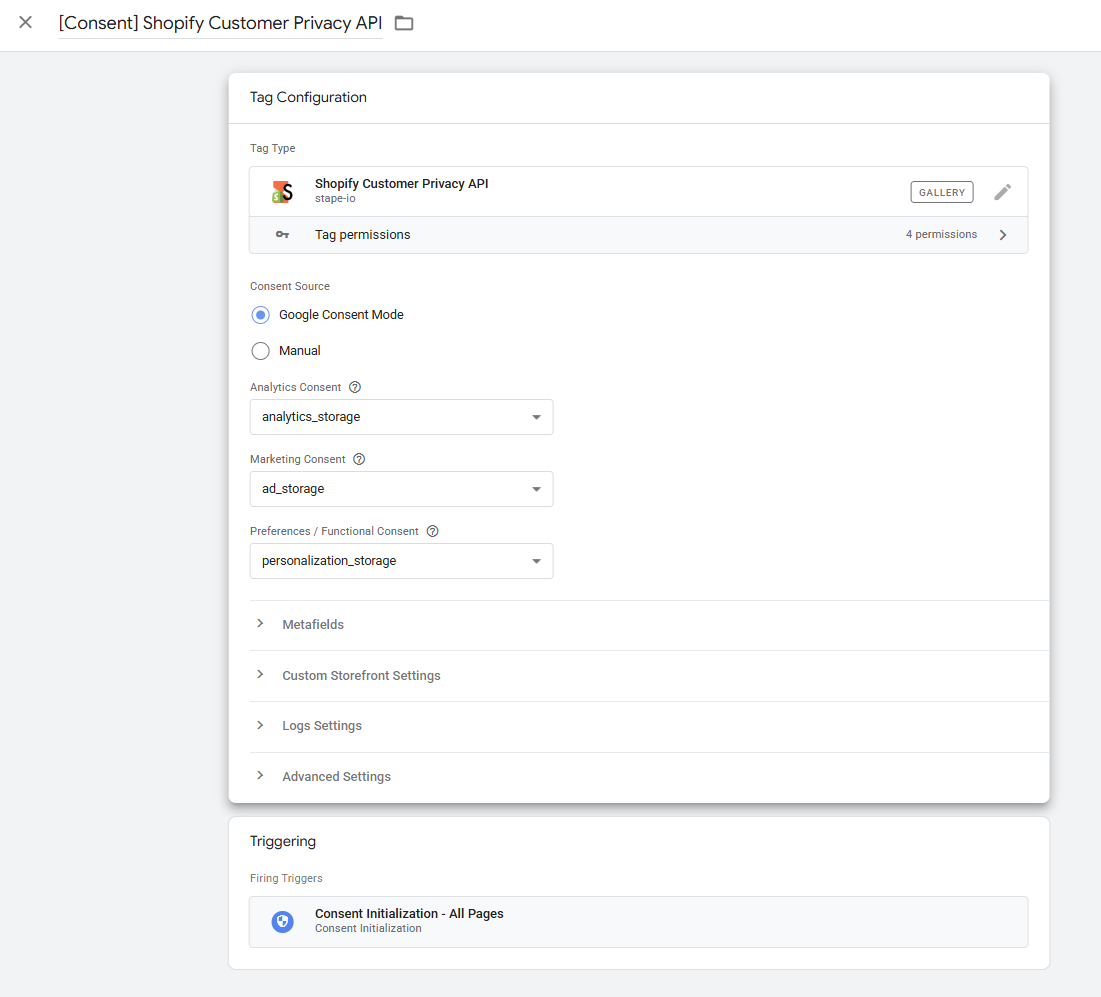
I tried setting up the Shopify Customer Privacy API tag for GTM web to properly sync Cookiebot consent with Shopify’s Customer Privacy API, and moved Cookiebot back to theme.liquid. Because that sounded quite promising. The setup of the tag looks as following:
When I test window.Shopify.customerPrivacy.currentVisitorConsent() in the browser console on the checkout page, I get:
Uncaught TypeError: Cannot read properties of undefined
(reading 'currentVisitorConsent') at <anonymous>:1:32
So window.Shopify.customerPrivacy is completely undefined in the checkout context.
On top of that, document.cookie throws a SecurityError in the Custom Pixel sandbox:
Uncaught SecurityError: Failed to read the 'cookie' property
from 'Document': The document is sandboxed and lacks the
'allow-same-origin' flag.
So both approaches to read the consent state inside the Custom Pixel are blocked. The only setup that actually worked (purchase events with gcs=G111 reaching the sGTM) was Cookiebot via GTM with the cookie-consent.liquid snippet disabled.
Thanks for testing this thoroughly. The SecurityError on document.cookie and customerPrivacy being undefined in the Custom Pixel sandbox is a Shopify architectural constraint — the sandbox runs on shop.app, a different origin, without allow-same-origin. I’d treat it as a design decision, not a bug to work around.
Shopify does offer browser.cookie.get() / browser.cookie.set() as async alternatives inside the sandbox. These can help with storage and state, but they don’t solve the Consent Mode initialization problem — gcs parameters need to be set before Google tags fire, not read after.
So your finding stands: in this architecture, the Customer Privacy API tag approach only works on the storefront side. It can’t propagate consent from the storefront into the Custom Pixel checkout context.
One thing worth checking: where GTM loads matters. If GTM is loaded via the Custom Pixel rather than in the head of theme.liquid, Consent Mode v2 defaults can fire several seconds late — which breaks gcs on purchase events. The more reliable technical path is GTM in theme.liquid head, provided Consent Mode defaults fire before any Google tag loads and your CMP/legal setup allows pre-consent GTM loading. The banner delay is the tradeoff, but at least gcs=G111 arrives correctly.
I’m on the same journey you described in this thread and would love to hear where you landed.
I’ve got the server-side pipeline working (purchases now match my client-side property), but I’m unsure my consent setup is ideal. Right now I’m running a hybrid: Cookiebot loaded inline in theme.liquid for a fast storefront banner, and the Cookiebot CMP tag in the web GTM container so consent reaches the checkout sandbox. It works, but it means uc.js loads via both paths, and I’m not sure that’s the cleanest approach.
When I tried loading Cookiebot only via the CMP tag in GTM (removing it from theme.liquid), the banner was much slower to appear, sometimes several seconds, which is the delay you mentioned worrying about.
So my questions:
Which route did you end up taking, Cookiebot via GTM only, the hybrid like mine, or something else?
Did the banner-delay issue bother you in production, or was it acceptable?
Is your checkout/purchase tracking now firing reliably with whatever setup you settled on?
Thanks, your thread was genuinely the most useful thing I found on this.
A couple of notes on why I changed a few things:
Led with “purchases now match” so Gerald knows you’ve already gotten past the core problem he had, he’ll calibrate his answer to your actual stage rather than re-explaining the basics.
Made the banner-delay point concrete (“sometimes several seconds”) since that’s the exact tradeoff he flagged, and it invites him to share whether he found a fix.
Turned the vague “what route did you take” into three specific questions, which makes it much more likely he gives you a useful, detailed reply rather than a one-liner.
Kept it warm and gave him credit at the end, people who solved something are more likely to respond when their earlier help is acknowledged.
Thanks for your posting. When I first started this thread I was wondering that not more people are affected by this, as Shopify is probably the most popular shop-CMS and Cookiebot is probably one of the most popular CMPs.
I’ve kept the setup I was talking about, because the numbers seem to be (kind of?) valid when you compare them with last year (it’s a highly season-depending shop) and that’s the most important part for us. So Cookiebot is loaded only in GTM via CMP Tag, nothing in theme.liquid anymore. And that’s the main tradeoff you’re mentioning: the consent banner reaaaally is slow to load. We’re talking about (in the worst case) around 3 seconds.
In order to (kind of) minimize the issues, the consent banner is loaded as overlay, so you have to accept some kind of consent settings or you cannot navigate on the site anymore. The acceptance rate is around 70%, which is normal for Austria/Germany. I guess in 99% of all cases that load time is not enough for a user to e.g. start a search or click an item.
The GCS111 issue @enricoforte is mentioning has - at least to my knowledge - not affected this site that much. Again, this is by comparing the conversion numbers from last year with this years. The purchase triggers are configured with Trigger Group triggers (cookie_consent_update + purchase) that Stape automatically creates when going through the Setup Assistant.
Two things worth separating here. The Trigger Group (cookie_consent_update + purchase) controls when the tag fires, but it doesn’t set the gcs value on the hit. That value comes from Google’s consent register at the moment the GA4 hit is built, which depends on whether the consent default ran before Google’s tag library initialized. So you can have the Trigger Group configured exactly right and still get the wrong gcs if defaults fire late, which is common when GTM loads through the Custom Pixel instead of the theme.liquid head.
On the YoY comparison: it’s a reasonable sanity check, but it only tells you gcs is fine if last year’s setup didn’t have the same timing fragility. If it did, you’re comparing two baselines that are both degraded, and “not much changed” can mean the gap was already there rather than absent.
Thanks @enricoforte, learned some new things here. Last year was a different setup (on Prestashop) without any timing fragilities. So there are other parameters as well (new year, new system, new tracking setup), which makes it really hard to tell what is affecting what in which ways.
@enricoforte your point about gcs being set at hit-build-time, not by the Trigger Group, is exactly what motivated me to keep the hybrid even though Gerald’s GTM-only setup is architecturally cleaner. Loading the gtag consent default inline in theme.liquid gives me a reasonable guarantee it runs before any Google tag library initializes on the storefront, which I couldn’t get when Cookiebot only loaded via GTM (banner could appear 2-3s in, and consent defaults landed even later). The Cookiebot CMP tag in the web container then handles the checkout iframe where theme.liquid can’t reach.
That said, I haven’t actually verified gcs=G111 is being set correctly on storefront hits, I’ve just assumed early defaults make it likely. Two questions:
What’s the cleanest way to verify the gcs value on outgoing hits in practice? I assume DevTools > Network > inspect the /g/collect request parameters on data.[mydomain], looking for gcs=G111 (granted) vs G100/G101/G110 (various denied/mixed states). Is there a better diagnostic, ideally one that surfaces the issue across many hits rather than spot-checking one?
If you’ve seen gcs misfires on a Stape + Custom Pixel setup, is there a recognizable pattern in the data (e.g. lower-than-expected conversion attribution to specific channels, modeled conversions not appearing, etc.) that would be the first thing to notice in GA4/Ads reports?
The cleanest read on timing is the GTM Preview Consent tab rather than picking apart single collects, because it shows the default and update commands in order and whether the default ran before the Google tags initialized. Your inline gtag default in theme.liquid is the right instinct, the only thing it actually guarantees is that nothing Google fires ahead of it on the storefront, so that is what you are checking. Worth separating two things on the value side: no gcs at all is the late-default symptom, whereas G101 is just analytics granted with ad_storage denied, so it is a healthy state on a GA4 hit and not a mixed one. The one caveat I’d add is that the “tag read consent state before a default was set” warning is often a false positive when a CMP tag triggers it, so it only really points at late defaults when a measurement tag throws it. Verifying any of this at production volume sits in the raw hit data rather than a client-side check, which matters because a broken default does not show up as missing conversions, it shows up as modeled ones, and that is where paid attribution can slide toward zero while total volume looks fine and budget gets moved on a number that no longer means what the team thinks.
Thanks @enricoforte, clear on all three points. I’ll run a GTM Preview Consent tab audit on the storefront and on a checkout flow to verify defaults are landing before measurement tags initialize, since you’re right that the failure mode here doesn’t surface as missing conversions, it surfaces as modelled ones and silently distorts paid attribution. Better to verify once now than to find the gap during a budget review.