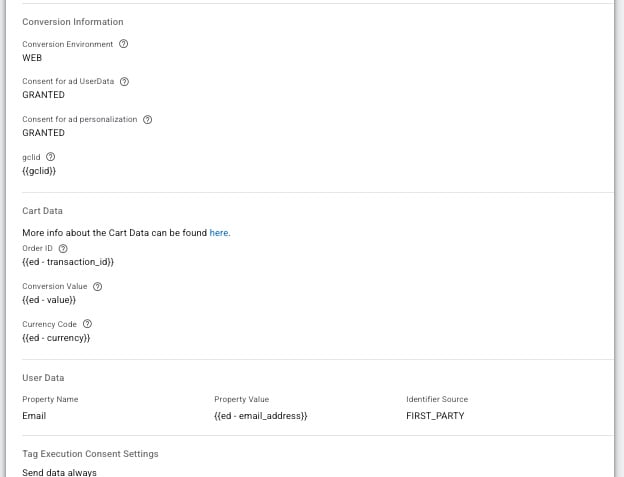
Hi there!
Anybody see this gclid issue on google offline conversion requests?
“Response-Body”: {
“partialFailureError”: {
“code”: 3,
“message”: “The required field was not present., at conversions[0].gclid”,
“details”: [
{
“@type”: “type.googleapis.com/google.ads.googleads.v25.errors.GoogleAdsFailure”,
“errors”: [
{
“errorCode”: {
“fieldError”: “REQUIRED”
},
“message”: “The required field was not present.”,
“location”: {
“fieldPathElements”: [
{
“fieldName”: “conversions”,
“index”: 0
},
{
“fieldName”: “gclid”
}
]
}
}
],
“requestId”: “McI2XLvVUQkjMC1BbdgU0A”
}
]
},
“results”: [
{
}
],
“jobId”: “3493123969000053203”
}
}
Hi,
Google reports that the GCLID is missing when conversion data is sent. Since you do not appear to be using the “Enhanced Conversions” feature, Google is attempting to attribute the conversion to a click, but the GCLID is also missing, which is why you are seeing an error indicating that a required parameter is missing.
If you want Google to attribute conversions without a GCLID, you need to include the user’s encrypted email address or phone number in your offline conversions. Then Google will be able to use the “Enhanced Conversions” mechanism to attribute the conversion.

We are sending everything but it stop working so I’ve seen there is another way now to send offline conversion with Google Data Manager API Conversion Events tag , might be this the issue?
Hi,
No, that shouldn’t have any effect, as the old method is still working.
I’ve just tested the method you’re currently using, and everything is working correctly on my end. If necessary, try updating the tag and sending a few test conversions with a test GCLID. You should then receive a different error message indicating that the GCLID format is invalid.
After that, if possible, please test it both with and without a real GCLID. If this doesn’t produce any useful results, please let us know.