Is there a way to change switch the order of Event Data in the Template?
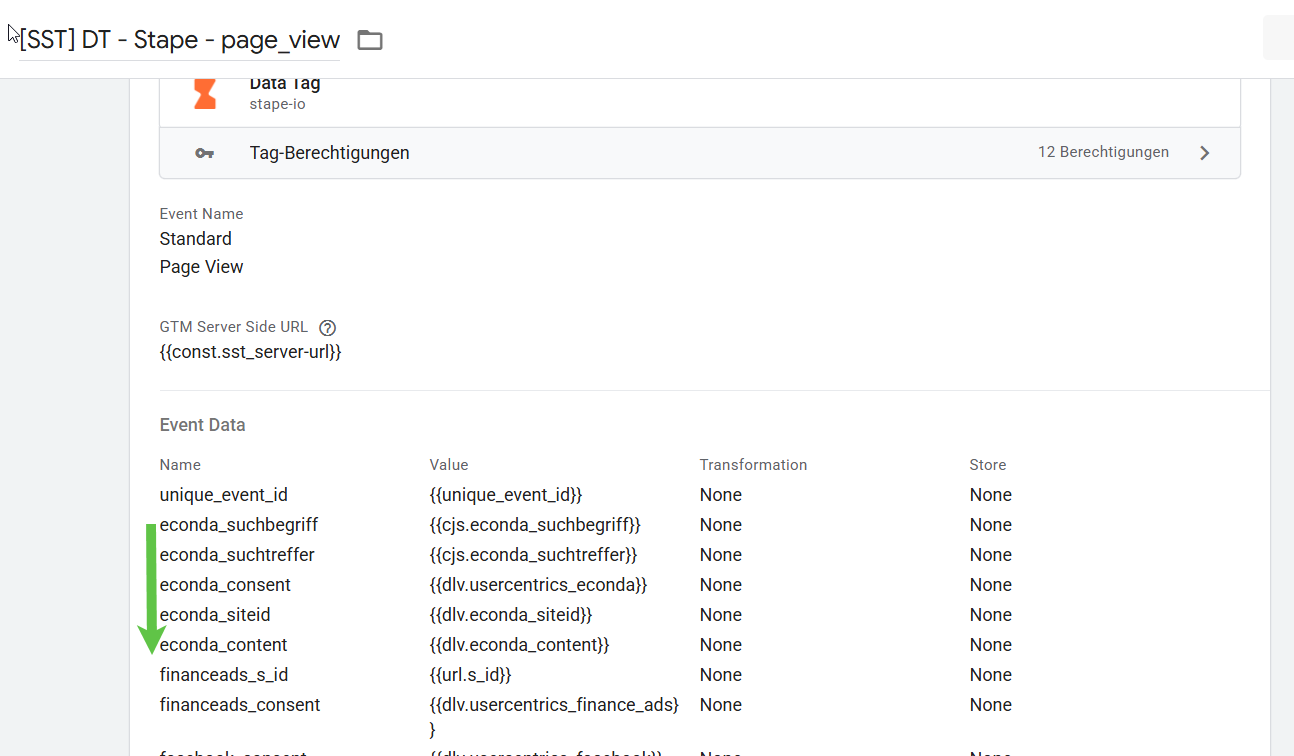
Why? To keep data for one service together/underneath each other.
I know i could do it very manually, but the risk of breaking / forgetting something is very high.
Is there a way to change switch the order of Event Data in the Template?
Why? To keep data for one service together/underneath each other.
I know i could do it very manually, but the risk of breaking / forgetting something is very high.
the answer is there are no native ways to do this
you can a) try chrome extensions, I believe GTM Plus can do A-Z sorting in tag tables, be careful though, it won’t matter for Event Data in DT but can screw up your lookup tables, cause sequence can be important there
b) if you want to be all neat about it, don’t send individual datapoints, but send an object like “econda_object” : {//your params here). Data Tag/Data Client will handle object alright and you can pull event data via dot notation
Hi Dan, thanks a lot for the tips. I’m going to try that. Do you have a resource or a more detailed example of how to setup, what you said in b)?
custom java script variable (you already have some of those judgin by the screenshot) or use something like Tag Manager Template Gallery
Hi Dan,
The sorting with the GTM Plus Addon currently only works with Google / GA4-Tags. The developers might changes this in the future. I really like the stape GTM Addon. Can you implement a sorting function in your own addon?
Hi Dan, the developers of GTM Plus Addon told me that the tabbing in your Stape Template is the problem, why the plugin doesn’t work.
Hi Dan, i tried several thing to group data in objects. But it only makes sense for us, when we need the same data across several data tags. Once a data e.g. event-name is different per data tag grouping makes it more complicated.
So reordering / sorting the event data would be a game changer for us.